本文最后更新于 2025年8月26日 晚上
问题描述
有一天我写博客的时候,突然发现在文章界面中点击一级标题时无法正常跳转到对应章节,而是会跳到页面顶部。
问题解决方案
在网上查了很多资料,包括官方git issues里面提出的解决方案,都无法正常解决这个问题。
随后我发现当鼠标悬停在一级标题时,浏览器左下角显示的网址链接总是只会以’#'结尾,因此我认为可能是因为在网站构建时没有正确地给href连接对应toc文本导致的问题,因此我找到了疑似用于操作toc的js文件toc.ejs。此文件在你的博客项目根目录\themes\fluid\layout\_partials\post目录下。
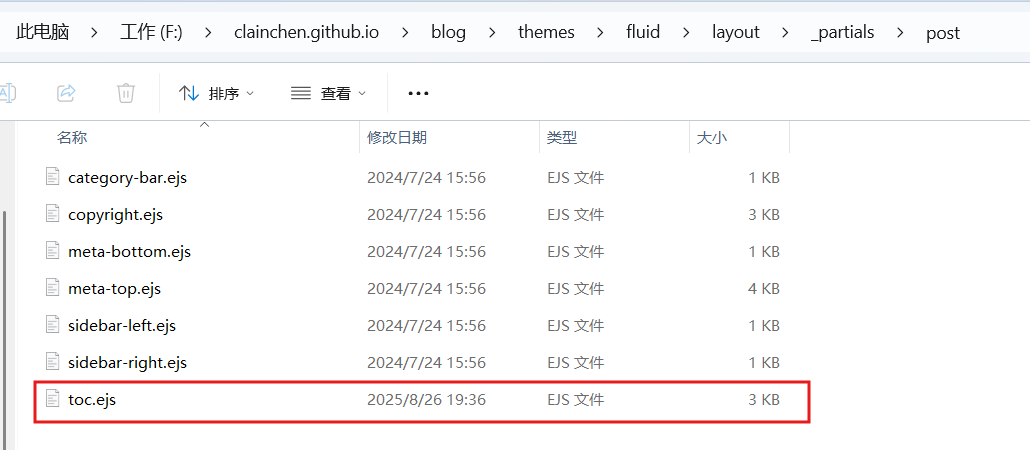
打开后,emmm由于我不做前端,所以我看不懂。
将该文件的内容交给deepseek老师之后,老师告诉我可以尝试做一下后处理。绑定toc地址的部分为
1
2
3
4
5
6
7
8
9
10
11
12
| window.tocbot.init(Object.assign({
tocSelector : '#toc-body',
contentSelector : '.markdown-body',
linkClass : 'tocbot-link',
activeLinkClass : 'tocbot-active-link',
listClass : 'tocbot-list',
isCollapsedClass: 'tocbot-is-collapsed',
collapsibleClass: 'tocbot-is-collapsible',
scrollSmooth : true,
includeTitleTags: true,
headingsOffset : -boardTop,
}, CONFIG.toc));
|
这段代码似乎就是fluid使用tocbot这个第三方库来动态生成目录,但是似乎除了写差错,导致没有正常给以及标题生成对应的href。
所以可以在这段代码后面加上一段对目录跳转地址进行后处理的代码。还是一样的我没弄过前端,看不懂怎么搞,依然交给ds老师。
老师告诉我这个方法:
在之前给的那段代码后面加上
1
2
3
4
5
6
7
8
9
10
11
12
13
14
15
16
17
18
19
20
|
setTimeout(function() {
jQuery('#toc-body a[href="#"]').each(function() {
var $link = jQuery(this);
var linkText = $link.text().trim();
var $matchingHeader = jQuery('.markdown-body h1').filter(function() {
return jQuery(this).text().trim() === linkText;
}).first();
if ($matchingHeader.length > 0) {
var headerId = $matchingHeader.attr('id');
headerID = headerId.trim().toLowerCase().replace(/[\s]+/g, '-');
if (headerId) {
$link.attr('href', '#' + headerId);
}
}
});
}, 300);
|
然后hexo clean && hexo s,就好了。
实际上最主要的就是这一段:
1
2
3
4
5
6
| if ($matchingHeader.length > 0) {
var headerId = $matchingHeader.attr('id');
headerID = headerId.trim().toLowerCase().replace(/[\s]+/g, '-');
if (headerId) {
$link.attr('href', '#' + headerId);
}
|
将找到的header做一下字符替换,然后加一个#前缀后连接到href中。
也许这并不是最优解,有什么更好的解决方案,敬请分享啊!